What MCP servers solve in real product teams
Internal documentation is usually rich but inert. It lives in Notion, Confluence, Google Docs, or markdown repos. People skim it, then bounce back into Slack to ask for “the latest process.” MCP servers change the pattern: instead of reading docs, users trigger workflows inside the app, with the app pulling the right context from your internal sources at the moment it matters.
In practice, an MCP server is a small service that exposes “tools” to an AI-capable client. Each tool is a well-scoped capability: search a doc corpus, fetch a specific policy page, create a task, start an onboarding checklist, or generate a form prefilled with the relevant rules. The app becomes the interface to your operating system, not another destination that competes with your wiki.
The target architecture with React, Supabase, and Tailwind
A reliable setup tends to look like this:
- React for the in-app UI where workflows run (checklists, forms, approvals, task creation).
- Supabase for authentication, Postgres, storage, and row-level security so the workflow respects permissions.
- Tailwind for fast, consistent UI patterns for workflow components and states.
- MCP server as the boundary between the AI client and your internal systems (docs, tickets, CRM, etc.).
If you’re building on a standard stack from day one and want to keep full code ownership, lovable.dev fits naturally here: projects are React + Supabase + Tailwind, and custom connectors can be added via MCP servers without turning your app into a one-off integration project.
Designing a custom MCP connector for internal docs
The difference between a demo and something teams trust is in the connector design. The goal isn’t “chat with our docs.” The goal is “run the right workflow with the right guardrails.”
1) Define the doc-to-workflow moments
Start by mapping recurring moments where users consult docs and then take action:
- Support reps checking a refund policy and issuing the correct resolution.
- Engineers reviewing an incident runbook and creating a postmortem task set.
- Sales ops referencing pricing exceptions and generating an approval request.
- HR referencing onboarding steps and spinning up an onboarding checklist.
Pick one workflow that’s frequent and has clear success criteria (fewer escalations, faster handling time, fewer policy violations).
2) Normalize the doc corpus
Your MCP server can only be as good as the inputs it can retrieve. Normalize across sources:
- Canonical IDs for documents (stable URLs or internal IDs).
- Structured metadata: owner, last reviewed date, audience, policy scope, product area.
- Chunking rules for long docs (headings become chunk boundaries, preserve breadcrumbs).
- Versioning: if the policy changed, the tool should surface the effective date.
Don’t optimize for perfect ingestion. Optimize for predictable retrieval and clear provenance so users can trust what the workflow cites.
3) Choose the minimal tool surface area
Most teams start with too many tools. Keep it tight and composable. A practical baseline is:
- search_docs(query, filters) → returns ranked chunks plus metadata.
- get_doc(doc_id) → returns authoritative content for citation.
- get_policy_summary(policy_key) → returns a short, structured summary (limits, exceptions, steps).
- start_workflow(workflow_key, context) → creates a workflow run in your app and returns a run ID.
That last tool matters. It turns “information retrieval” into an actual in-app action with state, auditability, and human-visible steps.
Implementing the workflow layer in the app
React components as workflow primitives
Think in primitives that can be combined:
- Context panel: the cited policy chunks with links back to the source.
- Decision form: fields the user must confirm (reason code, amount, customer tier).
- Checklist: required steps with a “why” tooltip sourced from docs.
- Action buttons: create ticket, send email, request approval.
Tailwind keeps these consistent across workflows. Standardize states like “needs review,” “blocked by permission,” “missing required context,” and “ready to submit.”
Supabase for permissions, audit trails, and data residency boundaries
Workflows create records, and records need governance:
- Auth: map users to teams/roles; avoid “shared workflow bots.”
- Row-level security: workflow runs should only be visible to the right group.
- Audit logs: store which doc chunks were cited, which steps were completed, and who approved.
- Storage: attach artifacts (screenshots, PDFs, exports) to workflow runs.
This is where doc tooling often fails: it can tell you what the policy is, but not whether the user followed it. A workflow run can.
Keeping the AI behavior predictable
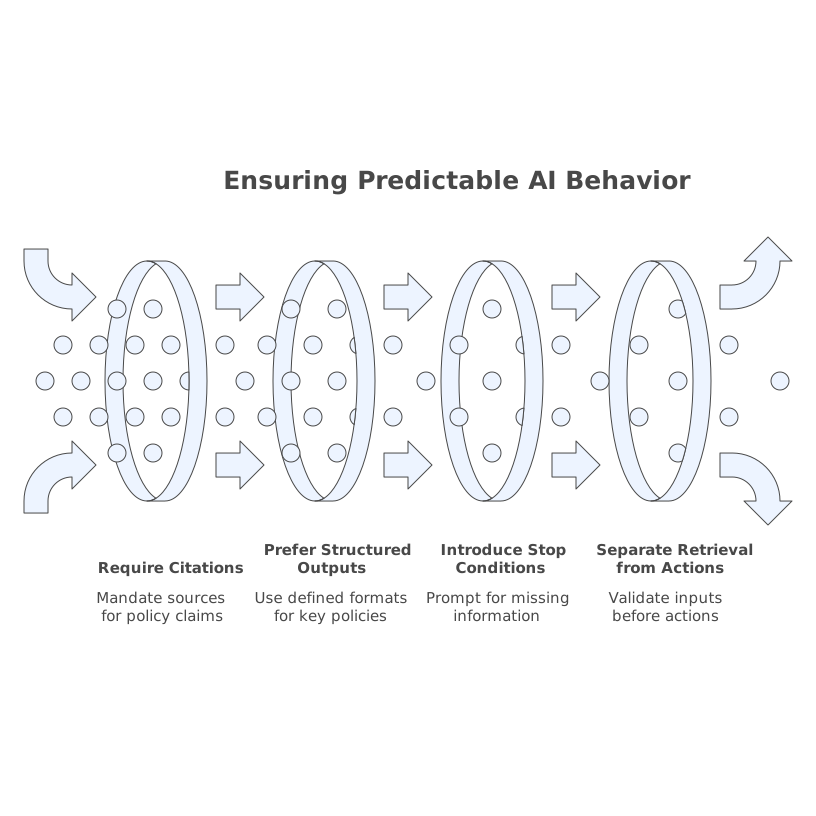
MCP servers are not only about access; they’re about boundaries. Use patterns that reduce surprises:
- Require citations from get_doc or search_docs outputs for any policy claim.
- Prefer structured outputs for key policies (limits, eligibility, required approvals).
- Introduce “stop conditions” where the model must ask for missing fields instead of guessing.
- Separate retrieval from actions: retrieval tools are safe; action tools should validate inputs.
If you’ve ever tried to keep an ad-hoc intake process under control, this same thinking applies. A lightweight contract for what information is required before work is created prevents chaos; the pattern is similar to an issue intake contract for turning pings and tickets into a single prioritized backlog.
Operational concerns teams hit in week two
Doc freshness and trust signals
Even strong retrieval fails if the doc is stale. Add trust signals to every snippet the connector returns: “last reviewed,” owner, and a direct source link. When something is missing, the workflow should offer “request update” rather than inventing an answer.
Measuring whether workflows reduce real work
Track outcomes, not chats:
- Time-to-resolution for the workflow category.
- Reduction in escalations or policy exceptions.
- Completion rate per step.
- Drop-off points where context is missing.
If you need lightweight measurement that doesn’t rely on third-party cookies, the same event discipline used for product analytics applies; scroll and first-party events are often enough. The approach in estimating visitor engagement without cookies using scroll depth and first-party events maps well to workflow funnels.
Security boundaries for internal docs
Keep the connector aligned with your security model:
- Enforce per-user access when fetching docs.
- Store only what you need (often: doc IDs + chunk IDs + citations, not full copies).
- Log tool calls so you can answer “who accessed what and why.”
- Respect regional constraints and internal governance.
When your app is the place workflows run, these controls become product features, not just compliance tasks.
A practical build sequence that avoids rewrites
- Pick one workflow tied to one doc set and one team.
- Implement search_docs + get_doc with strong metadata and citations.
- Build the workflow UI as a reusable set of React primitives styled with Tailwind.
- Add start_workflow so every run is persisted in Supabase with auditability.
- Expand tool coverage only after you can measure outcome improvements.
This is the “in practice” difference: MCP servers are not a novelty layer. They’re the connector that turns internal knowledge into repeatable, permissioned, measurable workflows inside the product.