The camera-off question in remote pairing
In remote pair programming, webcams often feel “free” because they’re default. But they come with real costs: bandwidth contention, CPU/GPU churn, fan noise, and a steady drip of self-monitoring that adds cognitive load. The goal of a camera-off protocol isn’t to make sessions colder. It’s to keep the shared context that matters (what you’re building, what you’re seeing, what you’re deciding) while removing the noise.
This protocol is designed for engineering teams who pair frequently, rotate partners, and need predictable call quality. It works best in tools that prioritize crisp audio, low latency, and clean screen sharing—exactly the constraints tuple.app was built around.
The Remote Pairing Camera-Off Protocol
The protocol is simple: default to camera-off for pairing, and replace “seeing faces” with lightweight signals that preserve intent, attention, and turn-taking. You still allow cameras when they add value—just not as the baseline.
Rule 1: Default to camera-off, explicitly
Make “camera-off by default” a stated team norm for pair sessions. Not a preference. A default. This removes the awkward negotiation at the start of every call and reduces the subtle pressure people feel to perform on video.
When someone wants video for a specific reason—new collaborator, sensitive feedback, onboarding, conflict resolution—they can ask. The key is that the request is tied to an outcome, not a habit.
Rule 2: Audio is the primary presence signal
When you remove video, audio carries more weight. Your protocol should treat audio quality as non-negotiable:
- Use a consistent mic (or headset) that’s comfortable for long sessions.
- Prefer wired or stable wireless connections.
- Keep background suppression modest so you don’t lose conversational cues.
Low-latency audio changes pairing dynamics more than most teams expect. Overlapping speech becomes less painful, interrupts become less hostile, and “thinking out loud” feels natural again. If you’re diagnosing call quality, the practical checklist in this audio lag guide for remote pair programming is a good reference point.
Rule 3: Establish “shared context” channels beyond video
Webcams often stand in for three kinds of context:
- Attention (Are you still there?)
- Intent (Are you following? Do you agree?)
- Turn-taking (Who’s driving? Who’s thinking?)
Replace those with explicit, lightweight channels:
- Verbal beacons: short phrases like “tracking,” “give me 10 seconds,” “I’m scanning,” “I’m about to suggest a change.”
- Reactions: simple emoji or quick acknowledgments when someone is explaining a complex idea.
- Pointer discipline: when referencing the screen, move the cursor deliberately and narrate what you’re pointing at (“top-right panel,” “line 42,” “this block”).
Rule 4: Use role clarity to reduce mental overhead
Camera-off sessions can feel vague if roles blur. Make roles explicit and easy to swap:
- Driver: hands on keyboard, narrates actions (“I’m going to refactor this function into two helpers”).
- Navigator: watches for correctness, edge cases, and next steps; asks questions; calls timeouts.
Then adopt a simple swap rhythm. Common patterns:
- Time-boxed: swap every 10–15 minutes.
- Milestone-based: swap after finishing a test, a function, or a small commit.
In purpose-built pairing tools, a one-click role swap and snappy remote control makes this feel like passing a keyboard rather than negotiating screen-share ownership.
Rule 5: Replace “eye contact” with check-ins at decision points
Video often functions as an implicit confirmation channel. Without it, teams can drift into parallel monologues. Fix that with explicit check-ins:
- Before a risky change: “Are we aligned on this approach?”
- After an explanation: “Does that match what you expected?”
- When stuck: “Want me to drive for a minute, or should we debug together?”
This keeps the session synchronized without adding more meetings or process.
Rule 6: Use visual cues on the shared screen, not on faces
When you need quick clarity—especially during architecture discussions or debugging—use on-screen annotations, quick sketches, or highlighting. The shared artifact should be the focus. It’s also more inclusive: annotations persist for the moment they’re needed, while facial cues can be missed or misread.
If sensitive information could pop up during sharing, protect the session with “veil” behavior: hide notifications, exclude specific apps, and keep the shared surface intentionally narrow.
Rule 7: Decide when cameras are actually worth it
Cameras aren’t “bad.” They’re just expensive. Define a short list of cases where video is likely to pay for itself:
- First pairing session with a new teammate or external collaborator
- High-emotion conversations (feedback, conflict, performance discussions)
- Teaching moments where quick facial confirmation reduces repeated questions
- Short social warm-ups at the start of a long pairing block
Even then, consider “video for 3 minutes, then off.” That often captures the benefit without carrying the full cost.
Why camera-off reduces cognitive load in practice
“Cognitive load” can sound abstract, but camera-on pairing adds real work:
- Self-monitoring: checking your expression, posture, background, lighting.
- Micro-interruptions: reacting to perceived reactions (“Did they look confused?”).
- Context switching: glancing between code and faces, especially on smaller screens.
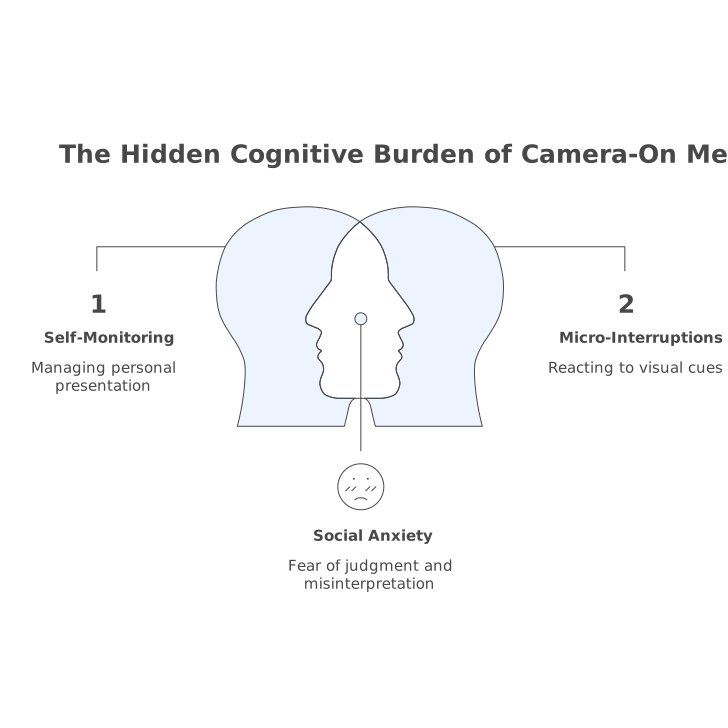
Camera-off shifts attention back to the code and the conversation. Teams often notice fewer awkward pauses because silence becomes “thinking,” not “disengagement.”
Bandwidth and latency benefits you’ll actually feel
Turning off cameras can reduce bandwidth pressure and, more importantly, reduce contention on the same network path your audio and screen-sharing rely on. In pairing, “good enough” video is rarely the bottleneck worth optimizing for; crisp audio and responsive control are.
This is why pairing tools that prioritize screen fidelity (including high resolution) and low latency tend to feel calmer: less stutter, fewer “can you repeat that,” and fewer accidental desyncs when you’re stepping through code together.
How to roll this out without making it weird
Adoption fails when it sounds like a policy about cameras. Frame it as a quality protocol:
- Start with one team for two weeks.
- Write the rules in a short snippet (7 bullets max).
- Pick one measurable outcome: fewer “can you hear me,” fewer restarts, fewer minutes lost to setup.
Then keep the protocol lightweight. If you need a reminder, bake it into your pairing checklist or the first minute of your session: “Audio check, camera-off, driver starts, swap at 15.”
What “good” looks like
A successful camera-off pairing culture is not silent or transactional. It’s high-signal. People narrate intent, swaps are fast, audio stays crisp, and shared context lives on the screen. When video is turned on, it’s deliberate and useful—not just default.
If your team already invests in pairing, the camera-off protocol is one of the simplest ways to make sessions feel lighter while preserving what matters most: shared understanding and forward progress.