List-Unsubscribe signals are reputation signals, not just compliance
During warmup, Gmail and Outlook are looking for low-friction ways for recipients to opt out. If they can’t find a working path, more people use “Report spam” instead. That single behavior shift can tank a new sender’s reputation faster than almost any other early mistake.
RFC 2369 introduced the List-Unsubscribe header for mailing lists. RFC 8058 later added one-click unsubscribe via a dedicated header format. In practice, mailbox providers treat these headers as a safety valve. Correct implementation reduces complaints. Broken implementation increases complaints and often correlates with other sloppy authentication or list hygiene problems—exactly what filters look for during warmup.
What Gmail and Outlook expect from RFC 2369 and RFC 8058
RFC 2369 basics
The List-Unsubscribe header typically includes at least one unsubscribe method:
- mailto: an address that processes unsubscribe requests
- https: a URL that performs an unsubscribe action
Example shape (don’t copy blindly): List-Unsubscribe: <mailto:unsubscribe@yourdomain>, <https://yourdomain/unsub>
Mailbox providers validate that the syntax is parseable and that the destinations behave like an unsubscribe path, not a marketing page or a dead link.
RFC 8058 one-click unsubscribe
One-click is not “a nicer link.” It’s a specific contract: the provider can trigger an unsubscribe without the user filling a form or logging in.
That usually means:
- A valid
List-Unsubscribewith an HTTPS URL endpoint - A
List-Unsubscribe-Post: List-Unsubscribe=One-Clickheader - An endpoint that accepts the provider request and suppresses the recipient quickly
If you advertise one-click but fail to honor it, you’re training providers that your messages create friction—and friction becomes spam complaints.
The misconfigurations that quietly break unsubscribe trust
1) The header exists but the URL is unreachable
Common causes include expired TLS certificates, blocked paths behind bot protection, geo restrictions, or an endpoint that only works in a browser session. Providers don’t troubleshoot. They downgrade trust and keep the spam button as the reliable fallback.
2) Using redirects that change meaning
A redirect chain that ends on a generic preferences page, login screen, or “confirm your email” form can invalidate the spirit of one-click. During warmup, anything that looks like “unsubscribe friction” is risky.
3) Mailto unsubscribe that isn’t automated
Mailto can be acceptable, but only if it’s processed consistently and fast. If it lands in an inbox that no one monitors or requires manual handling, recipients keep receiving mail, complain, and you accumulate negative signals.
4) Syntax errors and formatting issues
Small mistakes can make the whole header useless: missing angle brackets, illegal characters, multiple headers with conflicting values, or malformed comma separation. Many senders never notice because the email still delivers—just with a lower-quality “user control” signal.
5) Inconsistent behavior across streams
Warmup often involves multiple tools and streams: product email, outreach, newsletters, onboarding. If only one stream has working one-click unsubscribe while others are broken, the domain-level reputation can still suffer. Providers evaluate patterns across a sender identity, not just one campaign.
Why this hurts more during warmup
Warmup is a period of limited trust. You’re sending small volumes, often to a narrow audience, and filters have little positive history to rely on. So they lean on proxy signals:
- User complaint rate: a few spam reports can be proportionally huge at low volume
- Engagement vs. friction: can recipients easily opt out or do they escalate to spam?
- Consistency: headers, authentication, and behavior should be stable across sends
A broken unsubscribe path increases the chance that disengaged recipients choose the harshest action available. Gmail and Outlook both use complaints as a strong negative input. During warmup, that can mean inbox placement volatility, throttling, or sustained spam-folder placement.
How to audit your List-Unsubscribe implementation
Step 1) Inspect a raw message from each stream
Don’t test one email and assume it’s fine. Pull a raw source from Gmail and Outlook for:
- newsletter sends
- transactional messages that include promotions
- cold outreach sequences (if used)
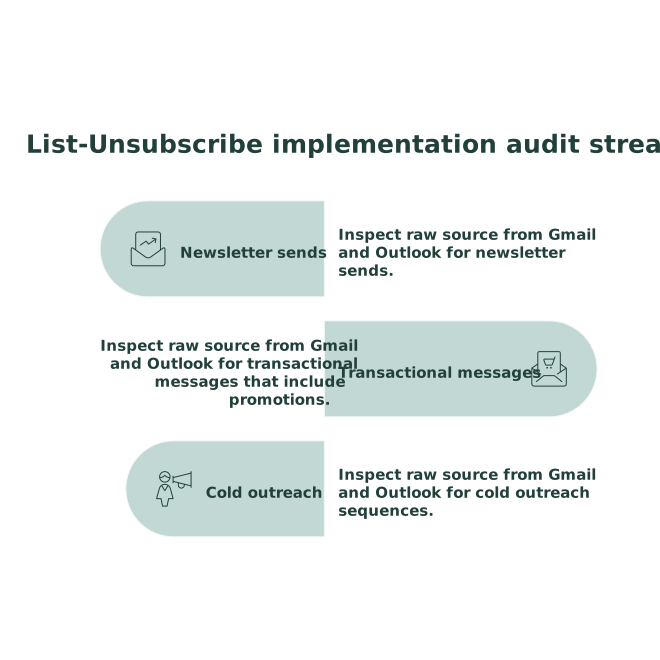
Confirm the headers are present and identical in intent (even if endpoints differ).
Step 2) Validate the endpoints like a mailbox provider would
- HTTPS loads without redirects to login or captcha
- No 403/404/500 errors
- Fast response
- Actually suppresses the address
For one-click, ensure your endpoint supports a provider-triggered request and does not require user interaction.
Step 3) Time-box your suppression SLA
Decide what “fast” means internally (minutes, not days). If you can’t reliably suppress quickly, don’t claim one-click. A simple, honest RFC 2369 implementation that works is better than a broken RFC 8058 signal.
Step 4) Coordinate with authentication and identity
Unsubscribe headers won’t save a sender with broken SPF/DKIM/DMARC alignment, but they can prevent avoidable complaints. If you’re tightening your sender identity, it helps to reduce other reputation drains at the same time. The idea is the same as controlling surface area in other systems: eliminate avoidable failure points early, similar to a cold-start defense for public AI agent endpoints.
Operational fixes that reduce complaints without reducing growth
Use an HTTPS unsubscribe URL as the primary method
Keep it direct. Avoid long tracking chains. If you need analytics, capture it server-side after the unsubscribe action, not before.
Make unsubscribing final, not a negotiation
Preference centers are fine, but not as a gate. The unsubscribe endpoint should complete the request even if the user doesn’t want to manage categories.
Keep messaging consistent with intent
If a stream behaves like marketing, treat it like marketing: include List-Unsubscribe and honor it. Trying to label promotional content as “transactional” while hiding opt-out options is a complaint magnet.
Warm up with real engagement, not just volume
Warmup tools can help stabilize early reputation by generating positive engagement signals while you gradually increase sending. A platform like mailwarm focuses on warmup and deliverability workflows across major providers, which can be especially useful when you’re trying to keep complaint-sensitive periods steady while you fix mechanical issues like headers and suppression logic.
If you’re measuring the impact of these fixes, focus on signals that correlate with deliverability: complaints, inbox placement, and the ratio of unsubscribes to spam reports. For broader measurement, you can borrow the same discipline used in estimating visitor engagement without cookies: define simple first-party events, then watch trend changes after each technical fix.
What “good” looks like after the fix
- Gmail and Outlook display an unsubscribe UI reliably for your marketing streams
- Unsubscribe requests succeed quickly and stop mail consistently
- Spam complaints drop relative to list size and send volume
- Warmup becomes more predictable because you removed a high-leverage failure point