Designing hybrid intelligence without escalation loops
Most “AI + human” customer service failures look the same: the bot can’t complete an action, escalates, the agent sends it back, and the customer is stuck in a loop. The root cause is usually not model quality. It’s control design. You need explicit approval gates, clear partial handoffs, and state tracking that makes “done” and “needs human” unambiguous.
Hybrid intelligence works when the AI can progress work safely and humans can intervene at defined points, without re-opening the same decision over and over. Platforms like typewise.app are built around this idea: an AI supervisor, specialist agents, and policy-enforced approvals so teams can scale automation while staying in control.
What escalation loops look like in practice
Escalation loops happen when the system treats escalation as a destination instead of a controlled transition. Common patterns:
- Ambiguous ownership: the AI thinks a human “owns” the ticket; the human UI shows it’s still assigned to the AI queue.
- Missing decision boundaries: the AI can propose a refund, but no explicit approval step exists, so it either stalls or escalates with a vague note.
- Untracked partial work: the AI already verified the order and drafted a resolution, but the human can’t see what’s complete and repeats steps.
- Re-trigger conditions: after a human reply, the automation restarts the same workflow and re-escalates because nothing changed in the system state.
Fixing loops requires designing your handoffs like a workflow contract: what’s allowed, what’s pending, who decides, and what evidence is required.
Approval gates: the control surface that prevents churn
An approval gate is a point where the AI must stop and request human authorization before taking an irreversible or sensitive action. Gates are not “escalations.” They are structured pauses with a tight payload: the decision, the context, the risk, and the recommended action.
Where to put approval gates
Place gates where the cost of a wrong action is high or where policy requires oversight:
- Financial actions: refunds, credits, charge reversals, quote discounts, renewals.
- Account and security actions: email/phone changes, access changes, identity verification exceptions.
- Legal/compliance actions: GDPR requests, data exports, regulated claims, liability language.
- High-impact operational actions: cancellations, irreversible shipments, warranty approvals.
What every approval request must include
Approval gates only reduce escalations if the human can decide quickly. Make the AI provide:
- Decision to approve: one clear action, not a narrative.
- Evidence bundle: order ID, policy clause, key messages, system checks performed.
- Risk flags: reason codes like “identity unverified” or “out-of-policy refund.”
- Fallback options: if denied, what the AI should do next (ask customer for X, offer Y).
Technically, this is also where you prevent loops: the approval gate should create a pending state that blocks the AI from re-running the same step until the state is resolved.
Partial handoffs: let humans do the minimum necessary work
Full takeovers are expensive and often unnecessary. Partial handoffs let the AI keep moving while humans handle a narrow task: approve, clarify, or perform a one-off exception. The goal is to prevent “restart from scratch” behavior.
Three partial handoff patterns that work
- Approve-and-continue: human approves a proposed action; AI executes it and finishes customer messaging.
- Human-asks, AI-finishes: human drafts one key question or a sensitive sentence; AI uses it to complete the workflow.
- Human-performs action, AI closes the loop: human handles an action that must be done manually; AI updates records, summarizes, and sends the final response.
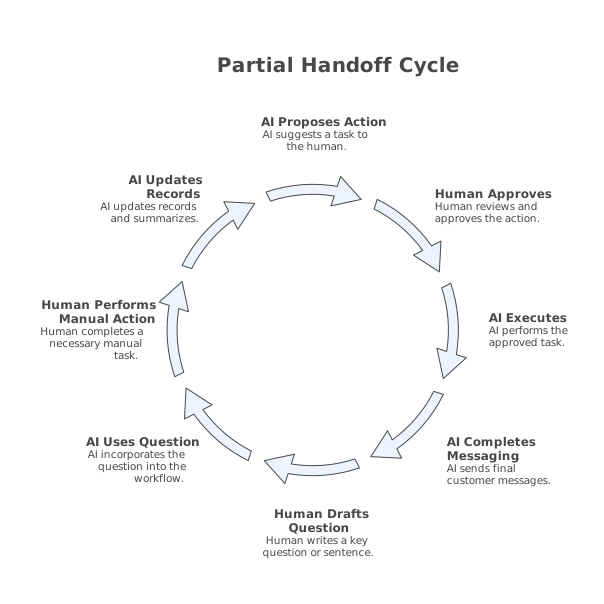
These patterns depend on a shared artifact: a structured “work-in-progress” record that both AI and humans can read and write.
State and ownership: the simplest anti-loop mechanism
You prevent escalation loops by making workflow state explicit and immutable enough that it can’t be accidentally reset. Use a small set of states that map to real ownership:
- AI-in-progress (AI can act)
- Waiting-on-customer (AI can remind, but not decide)
- Waiting-on-human-approval (AI cannot proceed)
- Human-in-control (AI cannot send messages or take actions)
- Resolved (locks workflow and prevents re-entry without a new trigger)
Additionally, store reason codes for every transition. “Escalated” is not a reason. “Escalated because address mismatch and customer failed verification” is a reason. This is what prevents the AI from trying the same thing again.
Design the handoff payload like a checklist
Handoffs fail when the AI sends long text and the human has to hunt for facts. Use a structured payload:
- Customer intent (standard taxonomy)
- Summary (2–3 sentences)
- Actions attempted (with system results)
- What’s blocked (exact missing permission, missing data, or policy conflict)
- Next best action (one recommendation)
- Customer message draft (ready to send)
If your human team frequently sees sensitive data in these payloads, apply a redaction strategy that preserves searchability and audit trails. The approach in this PII and PHI redaction playbook maps well to customer support notes: redact consistently, keep stable placeholders, and retain the minimum metadata needed for retrieval.
Policies that turn “AI suggestions” into governed decisions
Approval gates and partial handoffs need policy. Not a PDF policy—enforced policy. Define rules such as:
- Refund limits by segment (e.g., VIP vs. standard)
- Evidence requirements (photos, tracking scans, verification steps)
- Language constraints (no admissions of fault, compliant disclaimers)
- Tooling constraints (which systems the AI may write to)
When policies are executable, the AI can route correctly: approve gate vs. safe auto-action vs. full human takeover. This is where a hybrid platform matters: the orchestration layer can enforce the gates across channels and tools, not just in a chat UI.
Preventing loops caused by triggers and re-entry
Many loops are triggered by automation re-entry: a human updates a field, a webhook fires, and the AI restarts the workflow at step one. Add two controls:
- Idempotency keys: if “refund_proposed_v1” already happened, don’t propose again unless inputs changed.
- Re-entry rules: define what changes allow the workflow to resume (e.g., approval result, customer verification received), and block everything else.
In practice, teams often discover re-entry problems by monitoring repeated phrases, repeated escalations, and repeated tool calls. A simple keyword alerting system on customer conversations helps spot patterns early; the method in this keyword alert system for customer calls can be adapted to ticket transcripts and chat logs.
How to operationalize hybrid intelligence safely
Rollout should be staged, with measurable gates of your own:
- Start with “assist”: AI drafts, summarizes, and suggests next actions.
- Add approvals: AI proposes actions but requires explicit approval to execute.
- Introduce partial handoffs: humans approve or fill missing data; AI completes the resolution and messaging.
- Expand automation: only after evaluations show low regression risk.
Track metrics that reveal loops, not just containment:
- Escalation bounce rate: % of tickets that move AI → human → AI within 24–48 hours.
- Time-in-pending: time waiting on approval vs. waiting on customer.
- Repeat action attempts: same tool call repeated with unchanged inputs.
- Partial resolution rate: % of cases where AI completes at least one validated step before handoff.
Done well, hybrid intelligence reduces handoff friction and improves auditability. The key is designing approvals and partial handoffs as first-class workflow states, not ad-hoc escalation messages.
Vertical Video