The Rolling 72‑Hour Plan
The Rolling 72‑Hour Plan is a lightweight ritual for keeping tasks, your calendar, and your notes aligned without doing a heavy weekly review. Instead of trying to “reset your whole life” every Sunday, you keep a short planning horizon that rolls forward every day. The result: fewer forgotten commitments, fewer unplanned days, and less tool switching.
Why a 72-hour window works
Three days is long enough to see what’s coming, but short enough to stay realistic. Most planning breaks down when the horizon is too wide: you overpromise, you schedule work that depends on unknowns, and you create a “perfect plan” that collapses on day two.
A rolling 72-hour horizon solves that by keeping the plan close to current reality:
- Fewer stale tasks because you re-validate them frequently.
- Less calendar drift because you keep time blocks tied to actual work.
- Cleaner notes because you convert meeting outcomes into concrete next steps while they’re fresh.
The ritual in one sentence
Once a day, reconcile what you wrote (notes), what you owe (tasks), and what you’ve promised (calendar) for the next 72 hours, then time-block the essentials.
When to run it
Pick one fixed moment that you can protect most days. Good options:
- End of day (10–15 minutes) to set up tomorrow and reduce morning friction.
- Start of day (10–15 minutes) if your days change overnight or you manage reactive work.
The key is consistency. A short ritual done often beats a long review you avoid.
Step 1: Pull everything into one place
You can’t reconcile across three systems if your inputs are scattered. Start by consolidating the next-72-hour view into a single workspace where you can see:
- Upcoming calendar events
- Tasks due soon (and tasks you keep postponing)
- Recent notes (meetings, calls, quick captures)
This is where a unified workspace helps. In Routine, calendar, tasks, and notes sit side by side, which makes the reconciliation step practical instead of tedious.
Step 2: Reconcile notes into outcomes
Notes are only useful if they produce actions, decisions, or references you can find later. For the last 24–48 hours of notes, scan for three things:
- Commitments you made (“I’ll send…”, “I’ll draft…”, “I’ll review…”)
- Decisions that change priorities (“We’re shipping Friday”, “Pause project X”)
- Open loops that need an owner (“Someone should…”, “We need to check…”)
Convert commitments and open loops into tasks immediately. If an item is truly reference-only, label it clearly in the note so it doesn’t keep reappearing as a “maybe-task.”
If your biggest leakage is meetings turning into vague follow-ups, it helps to standardize how notes become time blocks. The 72-hour ritual pairs well with a structured capture method like this guide on closing the meeting-to-task gap.
Step 3: Reconcile tasks against the calendar
This is the heart of the plan. Look at tasks that could land in the next 72 hours and ask:
- Is this still real? If not, delete it or move it to a “later” list with a reason.
- Is it blocked? If you’re waiting on someone, rewrite the task to the next action you can take (ping, draft, prep) and add a follow-up date.
- Does it need time? If yes, it must earn a calendar block, not just a checkbox.
Be strict about the 72-hour scope. If a task can’t be started within three days, it can exist, but it shouldn’t clutter the next-72-hour view.
Step 4: Time-block only what matters
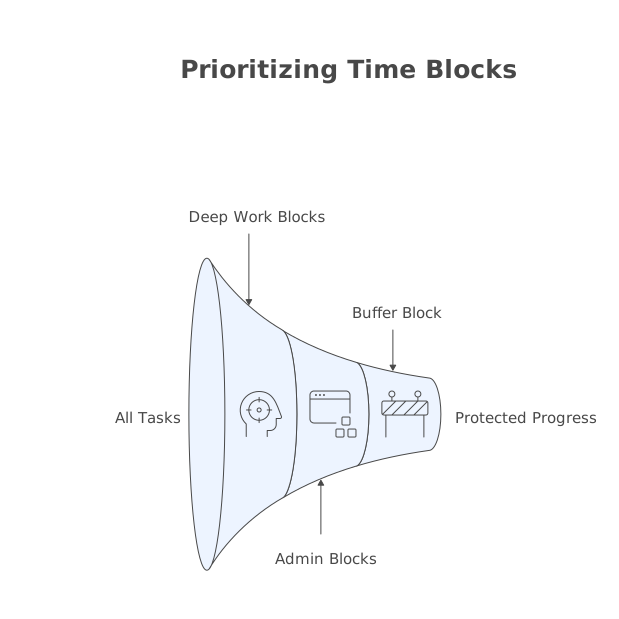
Time blocking fails when you try to schedule everything. The Rolling 72‑Hour Plan works when you schedule the few blocks that protect progress:
- One to three deep-work blocks for the most important deliverable.
- Short admin blocks for email, approvals, and “small-but-necessary” tasks.
- A buffer block to absorb interruptions, reactive work, or spillover.
A simple rule: if it’s important and takes more than 20–30 minutes, it deserves a block. Otherwise it becomes a task that floats forever.
Step 5: Set a “minimum viable day”
Within the next 24 hours, define the smallest set of outcomes that would make the day successful even if things go sideways. Typically:
- One deliverable that moves a project forward
- One follow-up that reduces risk (dependency, stakeholder, customer)
- One maintenance item that prevents future pain (billing, ops, cleanup)
This prevents the common failure mode where your calendar looks full but none of the scheduled items meaningfully reduce your backlog.
Step 6: Close loops with a short end-of-window check
As the 72-hour window rolls forward, quickly review what didn’t happen and classify it:
- Not important: delete or archive.
- Important but mis-sized: break into a smaller next action and re-block time.
- Important but displaced: name the reason (urgent request, meeting overload, dependency) so you can prevent a repeat.
This “naming the reason” step is what replaces the emotional weight of a weekly review. You’re not judging yourself; you’re adjusting the system.
Common pitfalls and how to avoid them
Overstuffing the horizon
If your next 72 hours are packed wall-to-wall, you’re not planning; you’re wishcasting. Leave buffers and accept that some tasks belong outside the window.
Keeping tasks that have no next action
Every task in the 72-hour view should be actionable. If it’s a project, write the very next step (“draft outline”, “compile examples”, “schedule review”).
Creating a second system
The ritual only stays lightweight if you don’t duplicate work across apps. Ideally, notes, tasks, and time blocks live together so reconciliation is a single pass, not three separate reviews.
What this looks like in practice
In 10–15 minutes, you can do a full cycle:
- Scan today + next two days on the calendar.
- Scan recent notes for commitments and decisions.
- Promote the real commitments into tasks.
- Block time for the top work and add one buffer.
- Delete or defer anything that can’t realistically start within 72 hours.
That’s it. No life audit. No massive backlog grooming. Just a rolling reconciliation that keeps your plan honest.
Why it pairs well with a unified workspace
The Rolling 72‑Hour Plan is tool-agnostic, but it’s easier when your calendar, tasks, and notes are integrated. When you can turn a note into a task, and a task into a time block, the ritual becomes a short daily habit instead of an administrative project.
If you’re building a system that reduces switching costs and keeps planning close to execution, Routine is designed for exactly that style of work: capture fast, reconcile daily, and schedule what matters.
Vertical Video