WIP budgets keep work moving without adding process
Most teams try to fix “too much in progress” with more meetings: longer standups, extra grooming, more status checks. That rarely solves the root problem. The root problem is usually that the team has no hard limit on how much work can be open at once, so everything becomes “started,” nothing finishes, and priorities churn.
A WIP budget is a simple cap on in-progress work. It’s a capacity constraint you set on purpose, then enforce inside your workflow. The goal is flow: fewer open threads, faster completion, clearer tradeoffs, and less coordination tax.
What a WIP budget is and why it works
A WIP budget is the maximum number of items the team is allowed to have in active states at the same time. Think of it like a spending limit for attention.
It works because it forces a behavior shift:
- Finish-first bias. When the cap is hit, the next move is to finish, unblock, or de-scope—not to start something new.
- Better prioritization through scarcity. You can’t pretend everything is urgent if there’s no room to start it.
- Less hidden multitasking. Multitasking doesn’t show up in story points. It shows up as longer cycle time and more “almost done.”
Set the budget by workflow state, not by person
The most practical WIP budget is a limit per workflow column (state), not a “per engineer” allocation. Your system should make it obvious when the team is violating the limit.
Start with just three active states:
- In Progress (building)
- In Review (PR review, QA, design review)
- Blocked (waiting on a dependency)
Everything else is either upstream (Backlog, Ready) or downstream (Done, Released).
A simple starting formula
Use a conservative default and adjust after two cycles:
- In Progress: ~1 item per engineer
- In Review: ~0.5 items per engineer (review is a shared bottleneck)
- Blocked: as low as possible; treat it as a smell, not a normal state
If you’re unsure, start lower. A tight WIP budget surfaces constraints quickly, which is the point.
Enforce the cap without extra meetings
The playbook is not “talk about WIP more.” It’s “make WIP visible, then add a few crisp rules.”
Rule 1: No new starts when the budget is exceeded
If In Progress is over budget, no one pulls new work. Instead, the team spends the next work block doing one of three things:
- Finish the closest-to-done item
- Unblock a blocked item
- Reduce scope so something can move to Done
This is how you replace coordination with a default action.
Rule 2: “Review is work” and has its own limit
Many teams cap development but ignore review. Then PRs pile up, cycle time balloons, and engineers “start one more thing” while waiting. Put a limit on review and treat it like a queue you actively drain. If Review is over budget, review becomes the highest priority work for the day.
Rule 3: Blocked items must have an owner and a next step
Blocked should never mean “waiting vaguely.” Each blocked item needs:
- An owner (one person accountable for moving it)
- A next step written as a single action
- A timestamp for the last touch
If you can’t name the next step, the item is not “blocked.” It’s underspecified.
Rule 4: Use async signals, not status meetings
You don’t need a new meeting to manage WIP. You need predictable signals. A lightweight approach:
- One Slack notification when WIP exceeds the cap
- A daily async prompt: “What will you finish today?”
- A visible dashboard (or saved filter) for In Progress, Review, and Blocked
If you already struggle with scattered requests, formalize intake so work enters the system cleanly; the issue intake contract for a single prioritized backlog helps reduce the random “can you just…” starts that blow up WIP.
Where Linear fits naturally
A WIP budget works best when the tool makes states explicit and fast to maintain. In linear.app, teams typically model WIP via a tight workflow and use views/filters to keep “active work” brutally honest. The key is not fancy configuration. It’s enforcing the constraint: you shouldn’t be able to ignore that In Progress is overloaded.
Also, WIP budgeting pairs well with structured issue hygiene: clear ownership, consistent states, and short cycle planning. Minimal overhead, high signal.
What to measure instead of story points
Story points are a planning abstraction. They can be useful, but they often become a proxy for output and a magnet for debate. If your goal is flow and predictability, measure flow.
1) Cycle time (start to done)
Track how long work spends in active states. Cycle time is the clearest indicator that WIP is too high or review is jammed. Use percentiles (50th/85th) instead of averages so outliers don’t lie to you.
2) Throughput (items completed per week)
Count finished items. Not points. Throughput helps you forecast delivery based on real completion rates. It also discourages “starting” as a form of progress.
3) WIP age (how long something has been open)
WIP age is an early warning signal. If an issue has been In Progress for 9 days and your normal is 2–3, it needs attention. WIP budgets reduce age, but you still need visibility to spot stuck work before it becomes a surprise.
4) Flow efficiency (active time vs waiting time)
Most delays are waiting: review queues, dependencies, unclear requirements. Flow efficiency tells you whether the team is actually building or mostly waiting. Improving this often requires fixing review policies, reducing handoffs, and clarifying “ready” criteria.
5) Arrival rate vs departure rate
If new work arrives faster than you finish it, your backlog grows and WIP pressure rises. Track the rate of new “ready” work entering the system versus completed work leaving it. If arrival consistently exceeds departure, the fix is prioritization and scope control, not sprint heroics.
Operational habits that make the budget stick
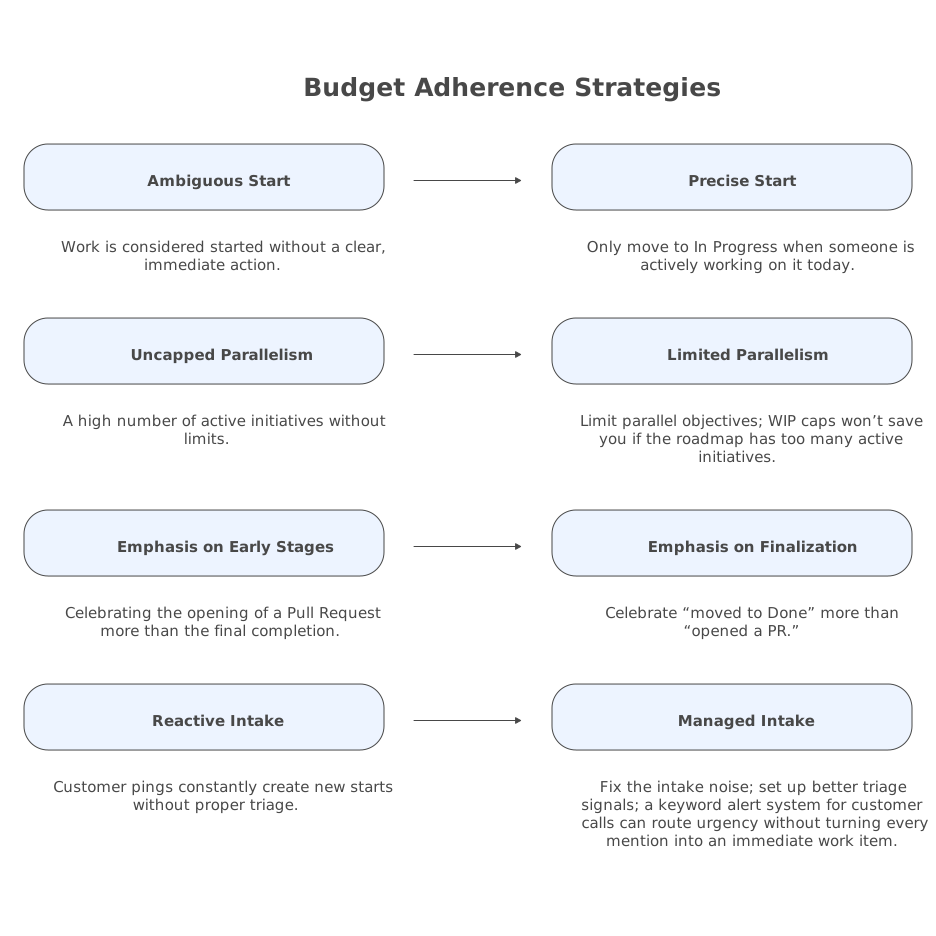
- Define “started.” Only move to In Progress when someone is actively working on it today.
- Limit parallel objectives. If your roadmap has 6 active initiatives, WIP caps won’t save you.
- Make finishing visible. Celebrate “moved to Done” more than “opened a PR.”
- Fix the intake noise. If customer pings constantly create new starts, set up better triage signals; a keyword alert system for customer calls can route urgency without turning every mention into an immediate work item.
A quick rollout plan
Week 1: Set the caps and observe
- Pick caps for In Progress and Review
- Make them visible
- Don’t argue about edge cases; collect examples
Week 2: Enforce “no new starts” when over cap
- Use the rule consistently
- Track cycle time and WIP age
- Identify the real bottleneck (review, unclear ready, dependencies)
Week 3: Tune the workflow, not the meeting calendar
- If Review is the bottleneck, add review ownership and time blocks
- If Blocked is common, tighten definition of Ready and dependency handling
- If In Progress stays over cap, shrink active initiatives
Vertical Video