Engagement signals you can measure without cookies
Cookie banners, browser restrictions, and privacy expectations make “session-level” engagement harder to measure. But you can still estimate whether a page is working by combining three cookie-free signals:
- Scroll depth as a proxy for content consumption
- Time-on-page proxies derived from in-page activity, not identifiers
- First-party events that represent intent (clicks, form steps, downloads)
The goal is not to recreate surveillance-style analytics. It’s to build a practical, privacy-first model that helps you answer: “Are people engaging, and where do they drop off?” Tools like plausible.io fit this approach because they don’t use cookies or collect personal data, yet still provide high-signal aggregate metrics like scroll depth and custom events.
A simple engagement model you can compute from aggregates
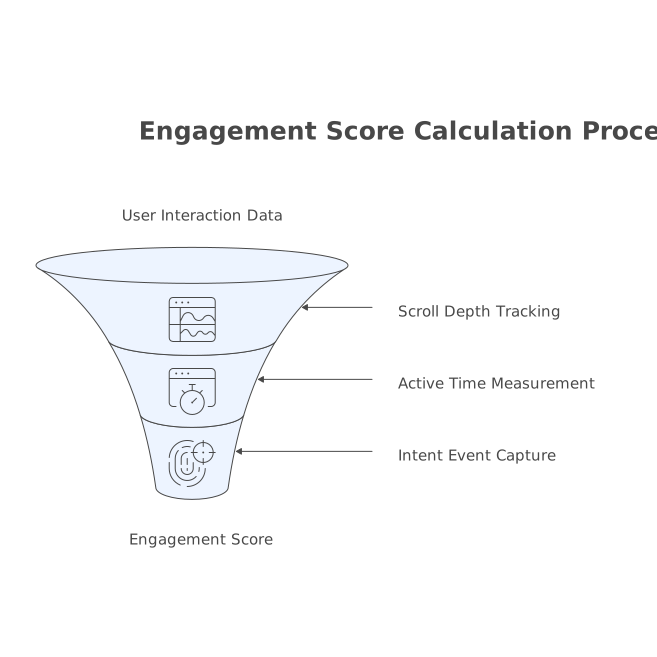
Think in terms of an Engagement Score per page, computed daily (or weekly) from aggregated counts. A workable model uses three components:
- Read proxy (scroll milestones)
- Active time proxy (heartbeats while the page is visible)
- Intent events (first-party actions tied to your page goals)
Each component is imperfect alone. Together, they’re stable enough to compare pages, test edits, and spot distribution changes.
1) Scroll depth as a reading proxy
Scroll depth is the fastest cookie-free engagement signal because it’s local to the page. Track milestones rather than continuous scroll. Typical thresholds:
- 25%
- 50%
- 75%
- 90% (or 100% for short pages)
Turn those into a single Scroll Score by weighting deeper milestones more:
- 25% = 1 point
- 50% = 2 points
- 75% = 3 points
- 90% = 4 points
Compute per page per day:
Scroll Score = (1×S25 + 2×S50 + 3×S75 + 4×S90) / Pageviews
Where S25 is the count of pageviews that reached 25%, etc. With an aggregate tool, these are simply event counts. This score stays meaningful even when you can’t follow a person across pages.
2) Time-on-page proxies without persistent identifiers
“Time on page” is notoriously noisy even with cookies. Without them, you should avoid pretending you have perfect dwell time. Use a visibility-based heartbeat instead.
A minimal approach:
- When the page is visible (tab active, window focused), fire a heartbeat event every 10 seconds.
- Stop when hidden. Stop after a cap (for example 5 minutes) to prevent over-counting background reads.
This yields an Active Seconds proxy:
Active Seconds = 10 × HeartbeatCount
Then normalize per pageview:
Active Time Score = Active Seconds / Pageviews
Important: this does not identify a person. It’s just aggregate “visible time pulses” on a page.
3) First-party events that represent intent
Scroll and heartbeats tell you “consumption.” First-party events tell you “intent.” Define 3–6 events that map to meaningful actions on your site. Examples:
- Outbound link click (to docs, GitHub, or partner pages)
- Newsletter signup submit
- Form step completion (step_1, step_2)
- File download (PDF, template)
- Copy-to-clipboard (CLI install command, code snippet)
Weight them based on closeness to value. Keep weights simple so teams can reason about them:
- Micro intent (copy, outbound click) = 2 points
- Mid intent (download, pricing click) = 5 points
- High intent (signup, request demo, purchase) = 10+ points
Compute:
Intent Score = (2×Micro + 5×Mid + 10×High) / Pageviews
Combine the signals into a single engagement estimate
Now combine the three normalized scores. One practical formula:
Engagement Score = 0.4×ScrollScore + 0.3×ActiveTimeScoreNormalized + 0.3×IntentScore
Two details matter:
- Normalize ActiveTimeScore onto a similar range as scroll/intent (for example divide active seconds/pageview by 60 to convert to “minutes per view,” then clamp to a max).
- Clamp extremes to reduce bot noise and one-off anomalies (for example clamp Active Seconds/Pageview to 0–300 seconds).
If you use an analytics product that already filters bots and referrer spam, your aggregates become more trustworthy. Plausible, for example, includes built-in bot filtering and supports codeless goals and custom events, which is exactly what this model needs.
Implementation notes that keep the data honest
Use milestones, not raw scroll position
Milestones reduce event volume and make reports stable. Also ensure each milestone fires once per page load.
Measure “visible” activity, not idle time
Heartbeats should depend on page visibility and user activity (optional). If you want a stricter proxy, only send heartbeats after user input in the last 15 seconds (scroll, keypress, pointer move). That reduces “open tab” inflation.
Define events from your page’s job-to-be-done
A blog post may value “newsletter signup” while a docs page values “copy install command” or “search within docs.” Keep events consistent across similar page types so comparisons are fair.
Expect measurement to change with UX edits
Engagement is partly a function of layout. If you move the CTA higher, scroll depth might drop while conversions rise. The model should help you see that trade-off rather than treat lower scroll as failure.
How to use the model in practice
1) Diagnose drop-offs page by page
If you see high 25% scroll but low 50%+, the intro likely matches the promise but the body loses people. If scroll is deep but intent events are low, the page might be informative but not directive (no clear next step).
2) Compare acquisition sources without cross-site tracking
You can still break down engagement by referrer or UTM tags in aggregate. The key is to compare normalized scores (per pageview) rather than raw event totals.
3) Create a simple content ops dashboard
Track for each key page:
- Pageviews
- ScrollScore
- ActiveTimeScore
- IntentScore
- EngagementScore
This is enough to prioritize updates without building a complex reporting stack. If you’re coordinating fixes across a backlog, an issue intake contract for turning pings and tickets into a single prioritized backlog pairs well with this model because it gives you a clean way to convert “engagement problems” into queued work.
Common pitfalls and how to avoid them
Short pages and above-the-fold answers
On short pages, scroll depth saturates quickly. Use 90%/100% milestones carefully and rely more on intent events (clicks, downloads) and heartbeat time.
Auto-scrollers and embedded content
Carousels and embedded iframes can create engagement-like activity. Prefer explicit events (play, expand, click) over assuming interaction.
Timezone and reporting boundaries
Daily aggregation can hide changes if your audience spans timezones. If you run geo experiments, be aware that device timezone behaviors can skew day-level comparisons; the note on automatic timezone switching skewing geo experiments is a useful reminder to align reporting windows with how you ship and analyze changes.
What “good” looks like without cookies
A cookie-free engagement model won’t tell you an individual journey. It will tell you, reliably, whether a page is being consumed, whether people stay active on it, and whether they take the next step. That’s enough to improve content, UX, and conversion paths while staying aligned with privacy-first analytics.