What “zero-downtime” really means in a no-code frontend
For a no-code frontend, “downtime” is rarely a full outage. It’s usually silent breakage: a list that loads empty, a form that submits but drops fields, a workflow that works for admins but not for end users. A zero-downtime data migration means you can evolve schema, storage, and APIs while live users keep reading and writing without noticing. That requires three building blocks: dual-write, backfill, and compatibility layers.
This is especially important when your UI is built visually, because bindings and workflows often assume specific field names and shapes. If you change data contracts without a buffer, you’ll ship breaking changes even if the database migration “succeeds.”
The core pattern: expand, migrate, then contract
The safest way to migrate is to avoid “big bang” switches. Use an expand–migrate–contract approach:
- Expand: add new fields/tables/endpoints alongside the old ones.
- Migrate: backfill historical data and keep new data synchronized via dual-write.
- Contract: cut over reads, remove old paths, and clean up.
The rest of this article explains how to implement each step without breaking a production no-code app.
Step 1: Design a compatibility layer before touching data
A compatibility layer is a boundary that keeps your frontend stable while your backend evolves. In practice, it’s one of these:
- API gateway / BFF that returns the “old” response shape even if the backend changes.
- Versioned endpoints (e.g.,
/v1and/v2) so old pages keep working. - Database views that present legacy columns mapped from the new schema.
No-code frontends benefit from this because you can keep existing bindings intact while migrating behind the scenes. If your app is built with WeWeb, you can keep pages stable while gradually updating collections and workflows, especially if your API contracts stay consistent. That’s one reason teams use weweb.io as the UI layer even when the data layer is evolving quickly.
Define the contract you will preserve
Before migrating, write down the minimum contract your live UI requires:
- Field names and types used in tables, lists, filters, and charts
- Required fields for create/update forms
- Error shapes used for validation messages
- Sorting/pagination semantics (cursor vs offset)
This “UI contract” becomes the source of truth for your compatibility layer. If you don’t document it, you’ll miss a dependency and discover it in production.
Step 2: Dual-write without corrupting data
Dual-write means every new write is applied to both the old and the new data model. It’s the simplest way to avoid downtime during a long backfill, but it introduces risk: partial failures and divergence.
Where to implement dual-write
- Backend service: best option. One request in, two writes out, consistent validation.
- Event pipeline: write once to the old model, emit events, build the new model asynchronously.
- Frontend: avoid if possible. It duplicates business rules across workflows and increases drift risk.
For no-code apps, keep dual-write out of the UI whenever you can. Put it in an API/BFF or server function so the frontend stays thin and predictable.
Make dual-write idempotent
Retries will happen. Your dual-write must be safe to repeat. Common tactics:
- Use a deterministic id (e.g., the same record id in both models).
- Store a
migration_write_idand ignore duplicates. - Prefer upserts over inserts for mirrored tables.
Decide how to handle partial failure
You need a policy when one write succeeds and the other fails:
- Fail closed: return an error unless both writes succeed. Strong consistency, higher user-visible errors.
- Fail open: accept the request if the legacy write succeeds, queue a repair job for the new model.
Most teams choose fail open during the migrate phase to protect user experience, then repair asynchronously with a dead-letter queue and replay tooling.
Step 3: Backfill historical data with verification
Backfill copies old records into the new schema. A backfill is not just a script; it’s a process with progress tracking and correctness checks.
Run backfill in chunks
- Chunk by primary key ranges or timestamps.
- Throttle to protect production load.
- Record progress (last processed id, counts, and checksums).
This lets you pause and resume safely, and it keeps latency stable for live users.
Verify with counts and spot checks
At minimum, verify:
- Row counts per tenant/account
- Null rate and type validity for critical fields
- Sampled record comparisons (old vs new) for computed fields
For more confidence, compute lightweight checksums per partition. Backfills fail quietly when a mapping rule is wrong; verification is how you catch that before cutover.
Step 4: Cut over reads gradually
After dual-write is stable and backfill is complete, move reads to the new model. Do it gradually:
- Shadow reads: read from the new model in parallel and compare results, but serve the old response.
- Feature flags: enable new reads for internal users, then a small percentage of traffic, then everyone.
- Per-tenant cutover: migrate one workspace/customer at a time to limit blast radius.
No-code frontends are well-suited to staged cutovers if your data access is centralized. For example, you can duplicate a data source configuration, test new collections on hidden pages, then switch bindings once the API contract is stable.
Keep pagination and sorting consistent
Many “it works on my machine” cutovers fail because the new model sorts differently or paginates differently. If your UI expects offset pagination but your new store uses cursors, your compatibility layer should translate so the frontend behavior stays identical until you’re ready to update it.
Step 5: Contract and clean up safely
Once reads are fully on the new model and you’ve monitored for a full business cycle (often one or two weeks), you can remove the old paths:
- Turn off dual-write.
- Freeze the old schema (read-only), then decommission.
- Remove compatibility mappings and legacy endpoints.
Don’t skip the “read-only” stage. It’s your last chance to detect unexpected legacy dependencies before deletion.
Operational guardrails that prevent surprises
Observability tied to user flows
Track errors and latency by endpoint and by high-value workflow (signup, checkout, save). Migration issues often show up as “soft failures” like validation errors or missing fields. If you’re already investing in first-party tracking, the same mindset used in measuring engagement without cookies can help you instrument critical flows with minimal surface area. See Estimating Visitor Engagement Without Cookies Using Scroll Depth and First-Party Events for an approach to event design that stays within first-party boundaries.
Security and abuse controls during migration
Dual-write and backfill often add new endpoints, jobs, and admin tools. Protect them. Rate-limit, authenticate background workers, and treat migration toggles like production secrets. If you expose any agent-like endpoints or public automation hooks, adopt progressive trust controls similar to the patterns described in Cold-Start Defense for Public AI Agent Endpoints With Progressive Trust and Edge Challenges.
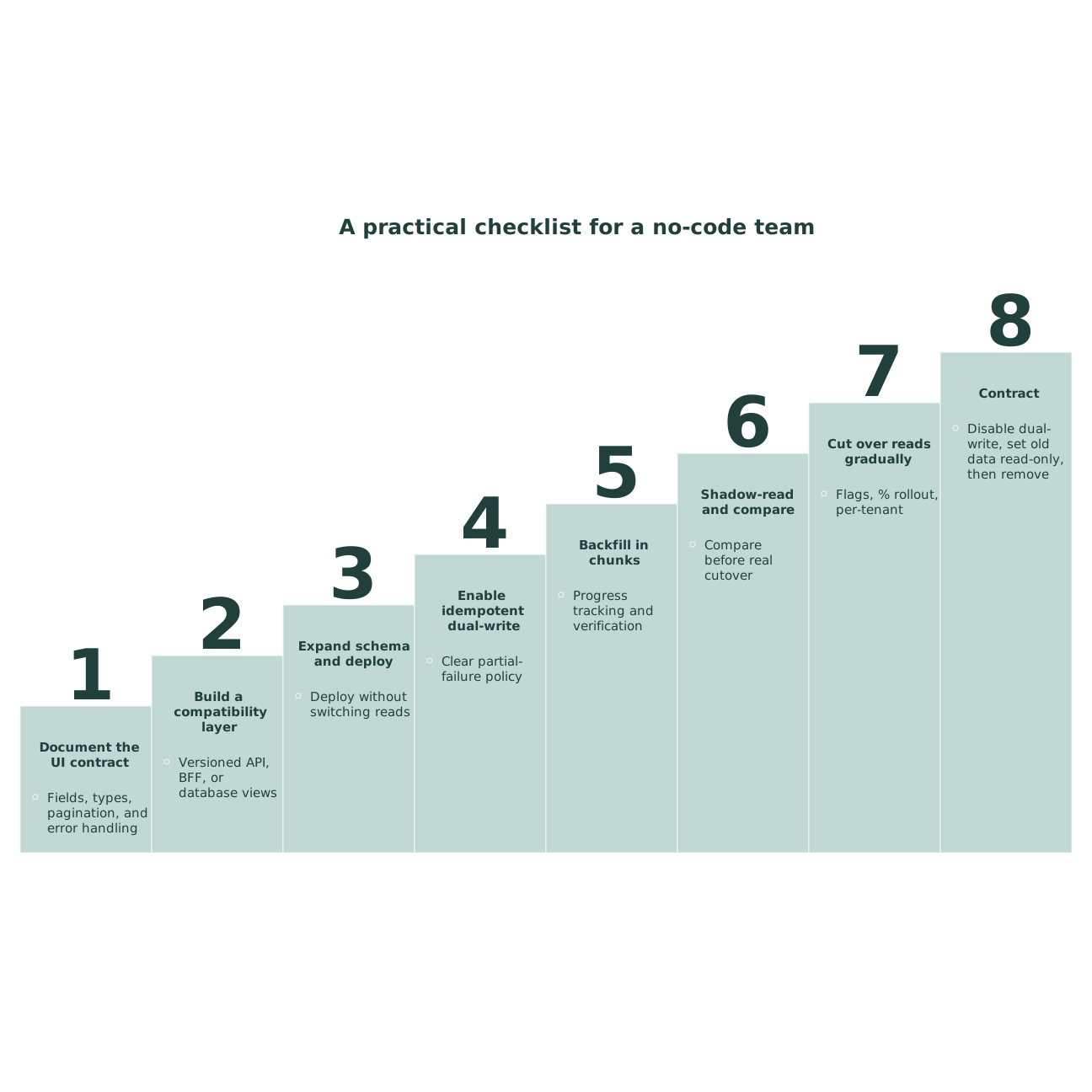
A practical checklist for a no-code team
- Document the UI contract (fields, types, pagination, errors).
- Build a compatibility layer (versioned API, BFF, or views).
- Expand schema and deploy without switching reads.
- Enable idempotent dual-write with a clear partial-failure policy.
- Backfill in chunks with progress tracking and verification.
- Shadow-read and compare before real cutover.
- Cut over reads gradually (flags, % rollout, per-tenant).
- Contract: disable dual-write, set old data read-only, then remove.
This approach keeps live users stable while your backend evolves, and it gives no-code teams a controlled way to ship schema changes without emergency UI rewires.